Pages

Monday, August 31, 2015

Get Fit!

I was recently asked about some of the apps I use for running and fitness trackers.  A student overheard the conversation and got involved wanting to know more about them.  Long story short, here's a list of some that I use and some that I would be willing to try out. I'm thinking that these could easily be adapted for use in the classroom. 

MapMyRun-- Map out your route, track your activity, keep a log of food and you can even share with friends.  You'll find both a web and app version along with MapMyWalk, MapMyRide etc.,  personally I don't think it would matter which one you use, as you can change your activity that you are doing.  I use this one to track every walk and run and to even map out a new route. 


Moves-- Is an App to track your movement.  I first used this to keep track of the number of steps I was taking in a day. (my phone is generally in my pocket.)  It will also give you a breakdown of calories burned for each activity.  It's available from both Google Play and the App store.  
Classroom use: Students could keep track of the number of steps they take in a day at school. This could be used for creating charts and analyzing data. Do we walk more on different days of the week? How many steps from our classroom to the computer lab? 


Couch to 5K --  There are a number of free versions available and paid ones.  I started out using Active's free version and then upgraded to the $1.99 so that I could change some of the settings to my own liking.  Having Johnny Dead as my trainer telling me to run was more motivating than just the standard voice of Constance. Either way the Couch to 5K app will get you moving from the couch to 5K ready in 9 weeks.   Available from both Google Play and the App store.


For Kids:
NFL Play 60 -- This app is amazingly fun! You actually have to run, jump, and make quick turns to get through the games! This endless runner game has you exercise while having a blast collecting coins throughout the game that will help you unlock new characters and NFL team gear!Available from Google Play and the App Store. 


Stop, Breathe and Think-- Available as an app or on the web.  A tool to help with meditation and to work on breathing.  Rated 4 Stars from Common Sense Media
Classroom use: Any and all classes when you just need a moment to relax and refocus. This may come in handy since testing season is upon us.


And one that I'm tempted to try out but haven't yet, (it costs $3.99) is  Zombies, Run!  With this app you listen to a story and there are certain times you have to run to complete quests as zombies snarl at your heal. Sounds like a fun way to get a run in to me. 


There are many more apps out there, but these are just a few.  And don't get me wrong, I don't always use an app. Someday's you do need to just log off, unplug and go run.

Thursday, September 12, 2013

We Give Books

Welcome back! It's hard to believe that the first full week of school is almost under our belts! With that being said, I've got a pretty cool site to share with you.
Source: http://www.wegivebooks.org/
Geared more towards grades K-5, We Give Books is site where you can read books online or download them to your e-reader. And the best part FREE! All you have to do is sign-up for an account, which consists of an email address and user name. When you visit the We Give Books site, click on the Read link which is at the top of the page almost to the middle.  Once here you can search or scroll through the available books.  There are classics such as the The Little Engine that Could.  Others include Llama Llama Misses Momma and History Dudes.  


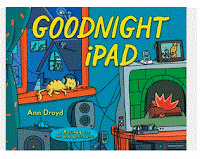
Source: http://www.wegivebooks.org/books/goodnight-ipad
A new title that I came across was Goodnight iPad. Based off of  Goodnight Moon, this is a cute rendition of "unplugging" at night.  I urge you to take a look at the site and sign up. You could easily read this story with your class using your Interactive Whiteboard. 

Monday, February 25, 2013

Iditarod 2013


Iditarod 2013 starts in t- 4 days 23 hours and counting. On March 2,  mushers and their dogs will start the 1, 150 mile race. The Iditarod trail was historically used as a mail, supply, and gold route from coastal towns such as Seward and Knick to the interior mining camps of Flat, Ophir, and Ruby. The trail continued to the west coast communities of Unalakleet, Elim, Golovin, White Mountain, and Nome.
The Iditarod trail became famous in 1925, when a diphtheria epidemic threatened the community of Nome. A dog sled relay transported life-saving serum from Anchorage to Nome.
Why teach about the Iditarod?

Even if you aren’t in Alaska, the Iditarod makes a great lesson! Teaching about the race is an opportunity to incorporate geography lessons, map skills, science concepts, and literacy skills into a real-world context. And there’s no denying the appeal of hundreds of hard-working, lovable dogs to children and adults! 
Additionally, the common practice of having each student follow a musher through the race provides invaluable practice in reading  texts (newspaper accounts) and using the real-time data available online.
Incorporating the Iditarod race can meet standards in a variety of content areas. 
The official Iditarod web site offers many resources for educators, including lesson plans and activities.
Other sites:
 Scholastic’s Iditarod web page includes many articles and interactive features.
Education World also devotes an entire page to integrating the Iditarod across the curriculum. 
Technology Resources
The Iditarod web site also includes many technological features:
 Zuma’s Paw Prints is a student-friendly blog written from the perspective of four sled dogs: Zuma, Gypsy, Sanka, and Libby. 
The Iditarod Insider, requires a subscription and features videos, trail fly-bys, and updated race content. 

Monday, February 11, 2013

State of the Union 2013 Address

Tomorrow, Tuesday, February 12th, at 9:00 p.m. ET, President Obama will deliver the State Of The Union address to Congress. I've highlighted the State Of The Union address before, (here) but I felt the need to blog about it again.  Typically the speech includes an optimistic outlook on all the opportunities for the coming year as well as a list of proposed legislation. It's expected that the 2013 address will focus on a push for new gun regulations and also climate change regulations. Of course the address isn't during school hours but you can watch it the next day via the official White House streaming feed.  Here you'll see TV shots along with supporting data, graphs, and charts making it more visual for students. Be sure to check out my post from last year, State of the Union 2012, for more resources and information. 

This year President Obama will also take part in a series of "Fireside Hangouts" - which is the 21st century take on FDR's famous radio addresses- to talk about his State of the Union Address. The virtual conversation will be hosted by Google, and the President will answer questions from Americans across the county about issues and policies from his speech. You can submit a question for the President and Vote on your favorites on the White House YouTube channel.  Then, be sure to watch the hangout live on Thursday, February 14th @ 4:50p.m. ET Whitehouse.gov, the White House Google+page, and YouTube.com/whitehouse


Everyone always says it but it's important more than ever to be aware of what's happening in our country. 


Thursday, February 7, 2013

Bear Tracker

Polar Bear's Oh My!


 Polar Bears International is the site for  the conservation group  dedicated to saving polar bears.  There are numerous resources on the site that teachers and students can use to learn about these magnificent creatures.
But what I really want to tell you about is Bear Tracker which is part of the Polar Bears International site. Bear Tracker plots the journey of polar bears in the Hudson Bay and the Beaufort sea north of Alaska.  You can view the travels of a single bear or all.  Bear Tracker also offers you option to "play" the bears journey that has been recorded over time. It's a pretty cool site if you are studying polar bears. 

If you are looking for videos on polar bears or other animals, check out Explore.org, which has a wide array of videos and even live webcams.


Wednesday, May 30, 2012

Newspaper Map

Newspaper Map- Here's a cool site that has front pages of hundreds of newspapers from around the world displayed on a Google map.  Click on a pin to bring up the front page of a particular paper. From here you can access the paper's website. You are able to filter by region/location and even language. You can even translate! Pretty awesome.
Educational value: I'm thinking it's an easy way to view papers from around the world and do a little study on how a hot news topic is being covered that day in various places. This would also be a great opportunity for language teachers to be able to acces language specific papers for their students. What better way to learn about Spanish than to read a Spanish newspaper?!

Thursday, April 26, 2012

Kindle Fire Education Apps

Regardless of which tablet you own, there are good apps available for use in the education setting. If money wasn't a factor I'd have some form of a tablet in the classroom for daily use. In fact in my ideal world, every student would have a tablet, but that's neither here nor there. For Christmas I received a Kindle Fire. Although a little disappointed at first it wasn't an iPad or Galaxy Tab, I've come to really like it.  My only complaint- I wish it had a camera. So I thought I would post some apps that I've found that you might like if you have a Fire of your own or have access to any type of tablet as these apps are (more than likely) available for other devices.  


50 States- Learn about each state with maps, total population, the state flower, largest city, etc. Even test yourself with a quiz. 


Pocket Penguins- Peek in on the penguins at the California Academy of Sciences with this cute app that lets you check out three different views (including underwater!) of their habitat. Not only is it interesting to see how the penguins live and behave, but the experience can also provide story starters. Have language arts students use this app to inspire creative writing.


NASA Nowt- The app includes breaking news from NASA, the image of the day, topical news updates, and the latest news from their missions- including the International Space Station. Use this app in science classes, current events and other discussions. 


Geo Quiz-  A challenge in categories such as: countries and flags, capital cities of the world, oceans/rivers/lakes, mountains and peaks, forests/deserts/plains, extremes, the big picture, the great explorers, climate change, and food.  There is also the option of mixing the categories into a random choice of 20 questions. The quizzes are difficult, but still lots can be learned.


I forgot to mention best of all these examples are all FREE.

Monday, April 2, 2012

What About Me?

I've been a little obsessed lately with Infographics. I can't help,  I think they are great and that there are tons of educational value in them. A simple search will turn up many different kinds and although I hadn't realized it until a few months ago, infographics are a part of our daily life. They are everywhere.  Anyways, here's a great site to create an infographic about yourself. What About Me? is free infographic generator made by Intel. Using your Facebook, Twitter and YouTube activity, it creates an infographic about you. You'll find parts of your Facebook posts, what time you generally use any of the three networks and what you most commonly post about. What About Me? even tells you what the average tone of your messages are. Are you happy or angry most of the time when you post?  When you've completed your infographic you can even download. Go ahead, give it a try, you might be surprised at what you find out! 

PS. The educational purpose of this? Getting high school students to look at their digital footprint. The overall question, what are their social networking skills saying about them?

Check out my What About Me? below:

Wednesday, February 8, 2012

Black History Month Resources

February is Black History Month and it's not hard to find a ton of resources on the Internet. However, sometimes it might be difficult to find "good" resources or ones that you might actually use.  So here are few and one new one that I'm particularly excited about, Mission US: Flight to Freedom!

The History Channel's Black History site has a great collection of quizzes, videos, images and information.

The National Archives. I've mentioned this in previous posts, but it's truly a fantastic site and they have put together a great set of resources that can be found here.

Letters of Note. I came across this site while reading through a blog. Letters of Note is a collection of "letters, postcards, telegrams, faxes and memos that are original and historical. Set up in a blog type format, it's a collection of confirmed tidbits of history that has the primary source material to go along with it. Pretty neat if I do say so myself and the reason for it being on this list- there's a letter from a former slave to his former master.


Mission US: Flight to Freedom. This is the one I'm most excited about! Mission US: Flight to Freedom is a fun and interactive role-playing game. It is the second in the series created by the people at Thirteen WNET. The first one was Mission US: For Crown or Colony. Players of Flight to Freedom assume the role of Lucy King who is a 14-year-old enslaved girl living in Kentucky in 1848.  The object of the game is to work to navigate her escape and journey via the Underground Railroad to Ohio.  The game can be played directly online or can be downloaded and installed on a computer.  FREE! Need to mention that word here. FREE! There is also an amazing set of teacher resources to go along with the game. You'll find DBQs, primary sources, visual aids, writing prompts and more. Take a look it's well worth it. Even if you don't plan to use it for Black History Month, you could use it for studying the Civil War. 

Wednesday, January 25, 2012

State of the Union 2012

I know, I know. Why on earth am I posting about the State of the Union? A few reasons. It's important. As a child, ages 5-18, we always talked about it in some way shape or form in school.  I'm a Social Studies, History geek. It's important. Whether you "like" or "dislike" the President, he had some good points. It's important. Have I said that enough? Alright you get the point. I'll spare you my personal thoughts on the actual address, but I did watch the whole thing and I did listen. But there are some things that you may find of use for discussions on the State of the Union.
The White House website contains the entire video of the address. You can even download the video.  Also on the White house website there is a print copy of the President's address.  The NY Times has also put together a play by play of the address. You'll be able to search through a list of topics and find the corresponding video segment that goes with it. 

(Image created using Tagxedo. I took the words of the address, copy and paste them into Tagxedo, chose the US as a shape and there you go. An instant word cloud that shows the most commonly used words in bold.)

Thursday, January 5, 2012

And the Race begins.. Bring on 2012

Happy New Year and welcome to 2012!  2012 brings much anticipation and speculation for the world and also the United States as it is a Presidential election year. So if you are looking for some information on the candidates and up to date information check out this site FiveThirtyEight. FiveThirtyEight a site all about numbers and is pretty cool. You'll also find links to the Primary Calendar, Poll Watch and various other information. This will be first of many posts that focus on the election this year, so be sure to check back!

Monday, December 12, 2011

The 12 Days of Christmas

Source: PNC
Ever wonder how much it would actually cost to purchase some of the items in the 12 Days of Christmas? This is a great to look at the rising cost of products or perhaps even the decrease in value. Through this interactive game, students can collect and find out just how much it would cost. So go ahead and take a look at The Twelve Days of Christmas, put together by PNC bank.  It's a great interactive if you are studying financial literacy and percent change over time. After you've completed this years price, you are able to scroll through and look at years past as a whole or individually by items.

Wednesday, November 9, 2011

Literacy. On the Web?


A month ago I wrote about attending a workshop on embedding literacy across the curriculum. (see old post) In total the workshop is 6 days long and so far I've completed 4 days. In my post I shared my ideas, thoughts and goals on literacy. Another co-worker and I were recently asked to help a Literacy Coach come up with some resources that she could pass on to participants in her workshop on Literacy. She was looking for anything from listening to reading, working with words, sorting, printables, etc. and the list goes on. So that's what I've been up to. I've created a wiki with the help of my co-worker in which we've put a bunch of resources together to promote literacy and using technology.  The wiki, Elementary Literacy Seminar is what we created.  Geared towards the audience of  K-4, you'll find links to sites that you can listen to books being read, download worksheets to go along with the stories and even play some games. Like I said there are quite a few resources there, so just play around.  For example the site Speakaboos has fables, nursery rhymes and other favorites, such as 'Arthur' that you listen to. And if that doesn't catch your attention, try out Storyline OnlineThe Screen Actors Guild is the sponsor of this site that brings stories alive to students through the use of streaming video. Each book includes lesson ideas and is read by actors such as Lou Diamond Phillips reading the Polar Express .  Check out our wiki, we'll continue to update it!

Thursday, November 3, 2011

Current Events!

CNN Student News  is a great site to check out if you are looking for daily current events for your students. CNN Student News has a program that airs each weekday during the school year.  The actual newscast itself is streamed on CNNStudentNews.com  and is even available as a free download as a video podcast on CNN. The news program is perfect for middle or high school students. As a teacher you can even check out some of the FREE teacher materials. Check out the Daily Discussion and Newsquiz, the Blog from A-Z and there are even printable maps in .pdf form. This site is definitely worthy of being added to your favorites bookmark!

Wednesday, October 26, 2011

Zoom.it

I found this cool tool while I was just searching around the net. Zoom.it lets you take the url of a picture, map, painting, etc., and creates a high resolution file. Then you are able to explore the whole image. Your able to zoom in on parts of the image that may not have been clearly visable by just viewing the standard size. With trying to get more document analysis in the classroom and the recent move to the Common Core, what better way to help your students?

This allows you to zoom way in on specific things, move around, zoom back out and highlight specific items in the image. Try it from the front of the class or use it in groups as they complete their document analysis.


Zoom.it also creates a Zoom url that you can take and embed on your website. Here's a link to an image that I used. And for some of you, you may want to try the bookmarklet. Give it a try! Happy Zooming :-)

Wednesday, October 5, 2011

"In 1492, Columbus Sailed the Ocean Blue."


Columbus Day is just around the corner. TeachingHistory.org has a great spotlight section on Columbus. You'll find resources for Elementary, Middle and High School students on the great Chris. Have your students take the quizzes on Columbus to see how much they really know. It can be pretty tricky.  Columbus day gives you a great opportunity to talk about myths and facts in history. You can even tie it in with European Exploration and the impact that it has had on the world. There are even video clips and documents from the Library of Congress. And if you don't use it in your lesson, take a second to explore it on your own. You might be surprised at what you find out. 
"In fourteen hundred ninety-two
Columbus sailed the ocean blue.

He had three ships and left from Spain;
He sailed through sunshine, wind and rain.
October 12th they sighted land,
And set their feet upon new sand."

Thursday, September 29, 2011

Got Books?

(if you'd like to skip my ramblings, scroll to the bottom for ideas for literacy using technology.)
Got Books?  It's an appropriate topic for this week. My colleagues and I attended the first two days of a six day workshop this week for Embedding Literacy in the Core Curriculum. We learned about different techniques to engage students in reading and writing. One of my favorites from the first day of class was a Textbook Treasure Hunt. Here students are presented with a worksheet, that presents them with directions or sends them on a "hunt" in their textbook for the answers. It serves as a great way to introduce students to the textbook and help them understand how it's really laid out and put together. And our group,  took it one step further and used our Treasure Hunt for the online help that is available in Microsoft Word. The workshop gave us a chance to explore Cornell Notes and opened our eyes to all the different types of activities that could be done in a classroom that incorporate writing. For example, bell ringers and journals. The hardest part of the first two days for me, was to come up with goals or a literacy plan that we take back to our districts, share with our administrators and colleagues and try to implement. Half of my group was missing for the second day, so I and my other colleague split up and she went with a district that she works in and I went with one of the technical centers. The experience was good to listen to them discuss their goals for literacy and how the would implement it. They discussed how some of them were already integrating some form of literacy in their classrooms, while some only did very little or none at all. And they knew that there would also be those that would be opposed to the whole idea. But in the end they came up with some good goals and a starting point.

Oh and I almost forgot to mention, the goal is 25 books per year. That's what the "big" people say. I was at first a little shocked about this number. 25 books a year. Sadly, I don't read that many BOOKS a year. But then BOOKS doesn't have to mean 250 page novels. It can mean newspapers, magazines, blogs etc., that total up to 25 books a year. Ah, ok. Now that's not so bad, or is it? I don't think so, and I think it's doable.

I left at the end of day 2 feeling a little overwhelmed and tired. I went home, turned on the TV and sat for 45 minutes watching a show I had DVR'ed the night before.  When that was over, I flipped through a series of channels, trying to find something to watch, muttered something under my breath about nothing being on and settled on a rerun. Background noise. That's what the TV is. But, the problem, I sat there and watched for another 30 minutes. I may have checked email or Facebook, but I watched more TV, of a show I've probably seen twice before. And why? I don't know, but it all leads to this blog post, which is LITERACY.

It has taken some thought, and I'll probably add to this over the course of the next 4 months as I continue on with the workshop. There are 4 more days to attend between November and January. So here's my question: How do you get literacy using technology?

  • Book Trailers or Movie Trailers (the presenter from the workshop shared the idea of a Movie Trailer.)  Students use Movie Maker or Photostory to create a trailer to either promote books* or as a project at the end of having read the book*. Students would include images, titles, music and narration.
  •  Read Alikes: Use a site like Wallwisher to have students suggest books* to read. They can add images and tell why they are making the suggestion. As an example you might see something like: If you liked the "Twilight Series" you should try "The Vampire Diaries." 
  • Blogs: Students create their own on-line detailing the books* they are reading. They could then share with the class and receive comments, book suggestions etc.  
  • Shelfari:  This site allows you to create a virtual bookshelf. My colleague, Shawn, shared this tool a few weeks ago and I'm so glad he did. I was excited to use it for myself, but even more excited I could share it in relation to this post and workshop. Check out the post on Shawn's Educational Technology Blog, where he explains how to use all the features of Shelfari. What a great way to generate book talks in your classroom and even school!
* does not mean solely a 250 page chapter book. Could be a magazine, blog, podcast,storybook.

That's my list for now. I think this is the longest blog post I've made to date but it's practicing my literacy skills. And my goal to embed some literacy into my department at work: I'd like to do some READ posters and display them around the office. I'm thinking the Section X director reading a playbook, the Assistant Superintendent of Instruction reading Common Core Standards on a Nook or  the Supervisor of  Instructional Technology using an iPad for blogs. :-)


Monday, September 19, 2011

Educational Videos and Games

Here's a collection of educational videos, games and lessons for grades K-12.  NeoK-12 has collected the best videos, games, and lessons from the Internet and put them into one spot. As a teacher you can create an account that will allow you to create video playlists that even include notes and instructions for your students.  Have students gain information on a topic by having them watch a video(s) and play games that correspond to lessons.  Students can also demonstrate understanding by creating their own  presentations that they can create and share online. Presentations can also be printed if need be. You'll need an email to create your own account. No student email addresses needed unless you want your students to save their own presentations. The Educational Games & Puzzles section of the website can be used on your interactive whiteboard, center activities or just for free time. Take a look!

Tuesday, September 13, 2011

A Cool New Tool- Print Friendly

I just came across this new tool, or it's new to me. It's called Print Friendly.  If you are like me you often find yourself with a web page or article that you might like to print off of the Internet or you have students who are doing research and want to print from web pages that have all the extra "stuff" that isn't needed. We've all seen it. The printer in the computer lab has 22 pages that just printed out, it's jumbled with ads, other information and really all the student wanted was two paragraphs. You know what I'm talking about. So here's the solution, Print Friendly

Print Friendly lets you get rid of the extra "stuff" that isn't needed. You simply copy and paste the URL of the document you want onto their site and click. You'll then get a document that allows you to do a variety of things such as delete images, boxes of texts, resize or change fonts, and save as a PDF. You can even install a bookmarklet that allows you to simply click a button on your browser's task bar whenever you are on a site you want to print. You can save or print your final versions. And- you can even email your document if you wish.

Thursday, September 8, 2011

TeachingHistory.org

I've been a big fan of  TeachingHistory.org for some time now. It's a great site with plenty of resources for your classroom and own general knowledge. FREE. How could I forget to mention that? They also email you a monthly newsletter which highlights key events for the month. But one really nice thing that TeachingHistory.org has is their FREE Historical Teaching Posters. Last year I obtained their poster for conducting historical research and this year they are offering a FREE poster on the Civil War. I urge you all to take a look at the site and sign-up.  
One last thing I'd like to mention is Richard Byrne and his Free Technology for Teachers Blog! Bookmark it if you haven't done so already and be sure to check out his post about the Historical Posters. Free Technology for Teachers is an AWESOME blog, filled with tons of resources and info. I love the idea of using the poster, the interactive poster and then having students create their own digital poster using Glogster! What a great a project!